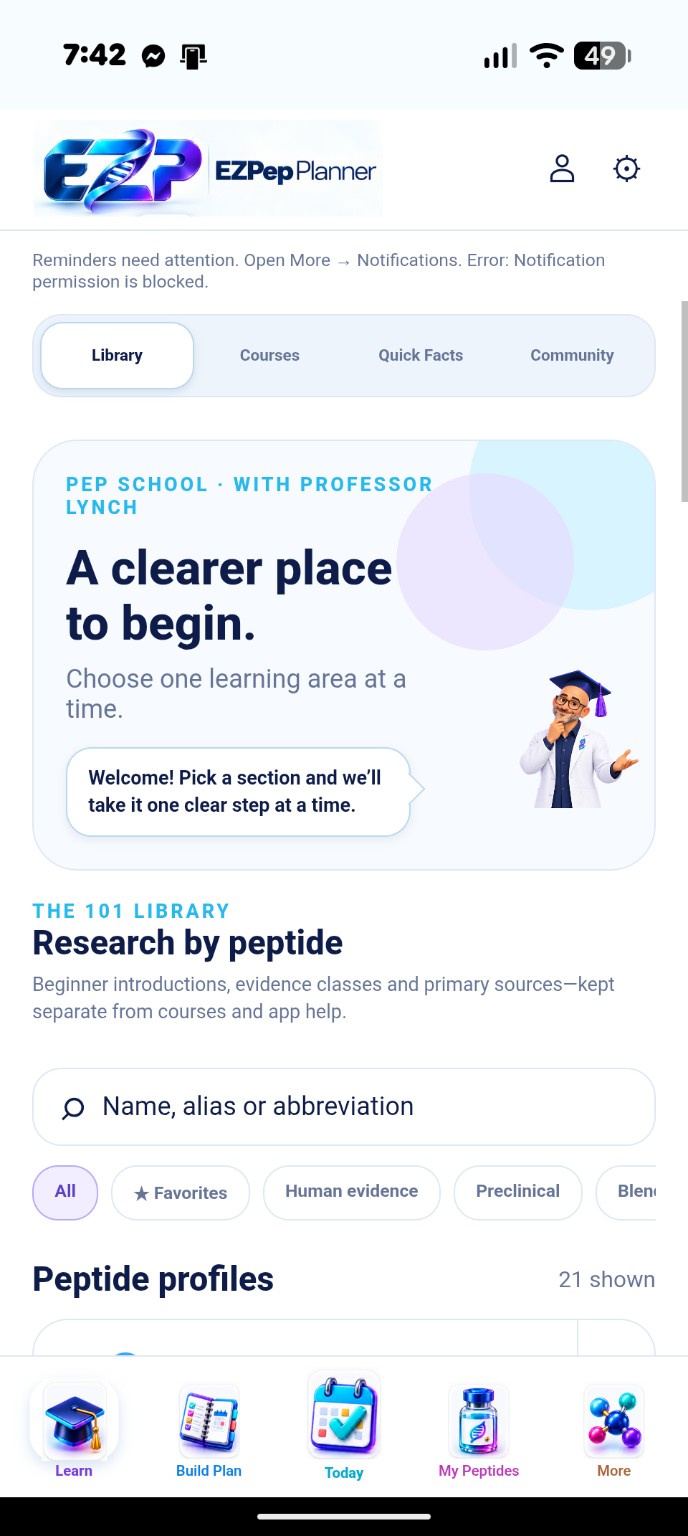
Choose one learning area at a time.
Browse peptide introductions, evidence labels and cited sources in the Library. Courses offer three introductory paths with 15 short lessons. Quick Facts and app help give you another way to find your bearings.
 EZPep Planner
Your plans. Your progress. One clear place.
EZPep Planner is getting ready to open. Join Professor Lynch for launch news and the first details of our introductory offer.
No paid subscription. Just launch updates you choose to receive.
A guided place to understand the research, build your own plans and keep your daily routine organized.
Currently in private beta. Get launch updates for opening news and membership information.
 EZPep Planner · Opening soon
Get the launch announcement and introductory-offer details in your inbox.
Launch updates are separate from your planner account. You can unsubscribe at any time.
Explore the research, understand the controls, and build a plan from your own information.
Browse peptide introductions, evidence labels and cited sources in the Library. Courses offer three introductory paths with 15 short lessons. Quick Facts and app help give you another way to find your bearings.
Professor Lynch explains the planning fields through question-mark help. Choose a basic schedule or stages, review your vial inputs and calculated quantities, then save the plan you want to track.
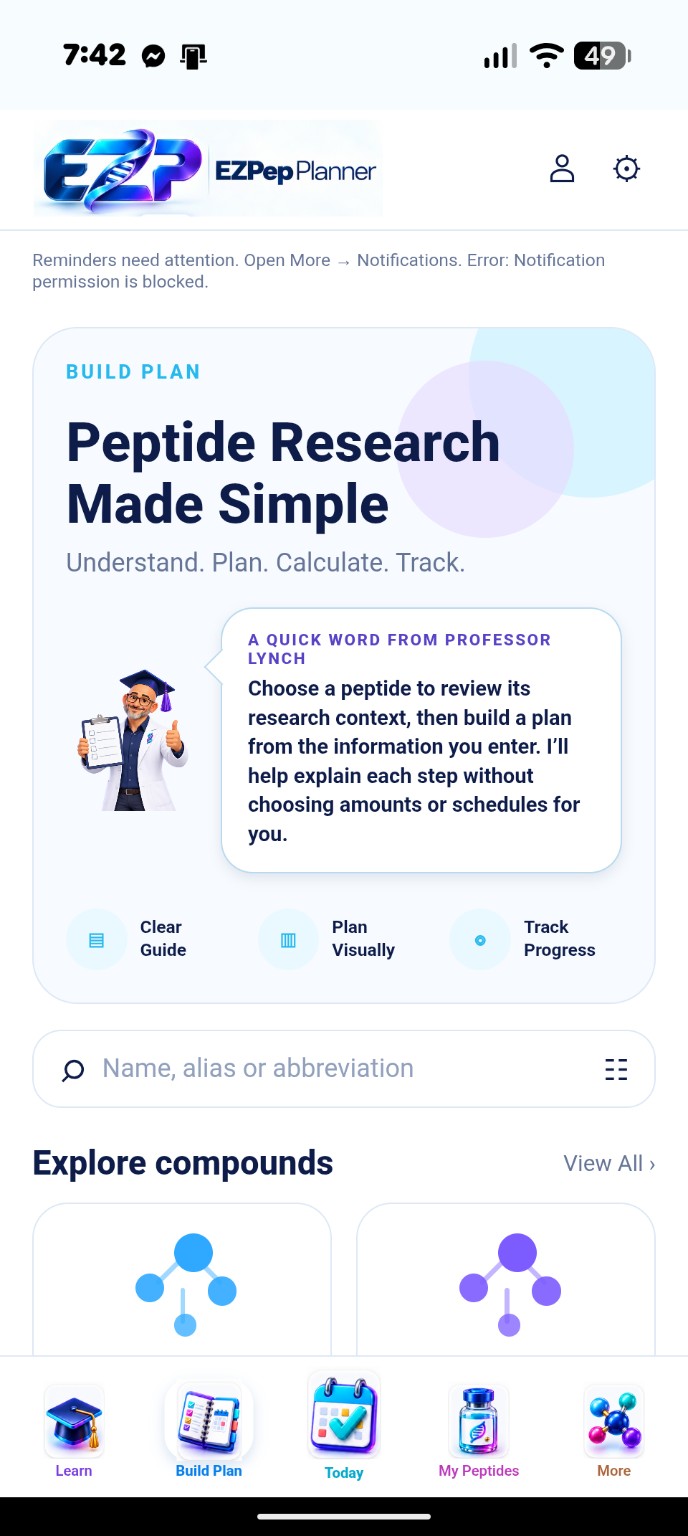
Educational context and planning help. You choose the information you enter; EZPep does not choose a peptide or dose for you.
A closer look at learning, planning, daily tracking and saved records, using real phone screenshots.
The Guide separates Basic Plan from Advanced Plan. Start with one amount and schedule, or arrange multiple periods when your own plan changes over time. Professor Lynch’s question-mark help explains the controls.
See daily tracking below ↓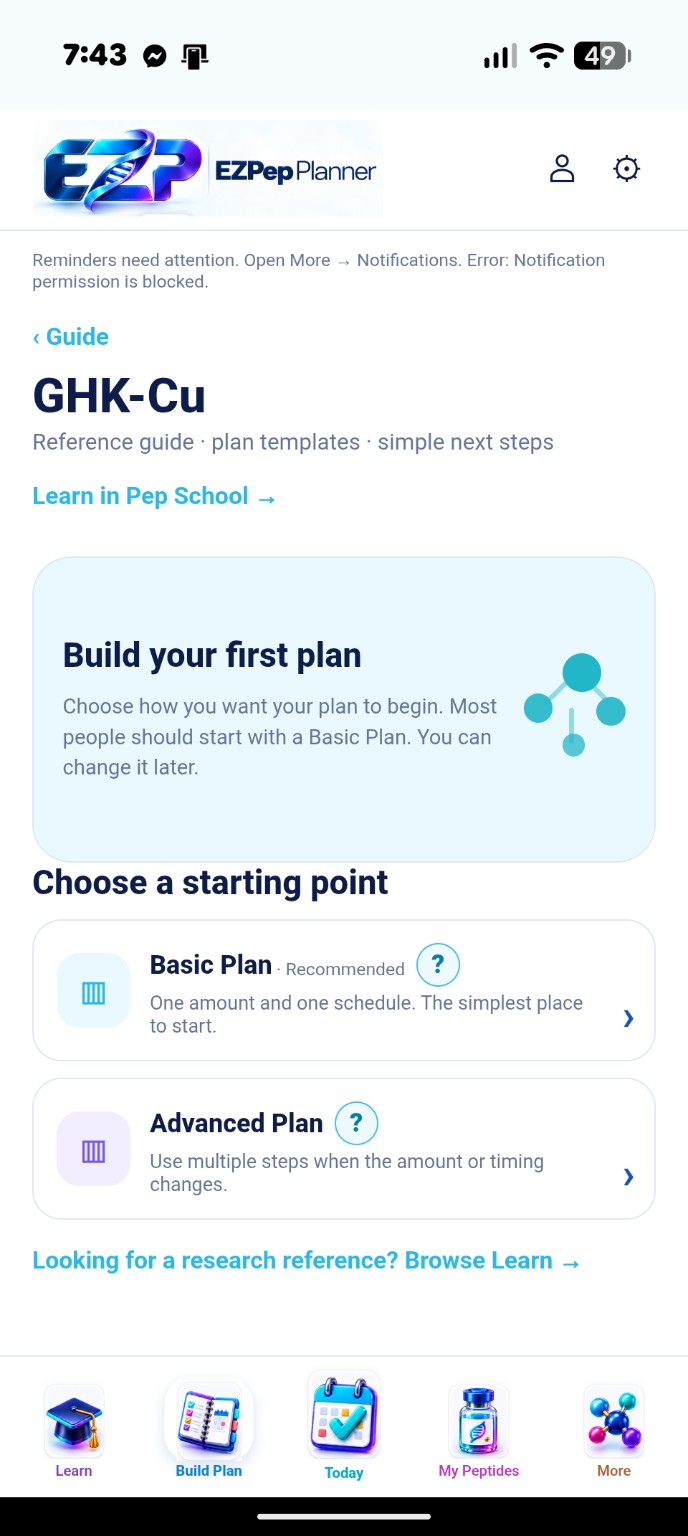
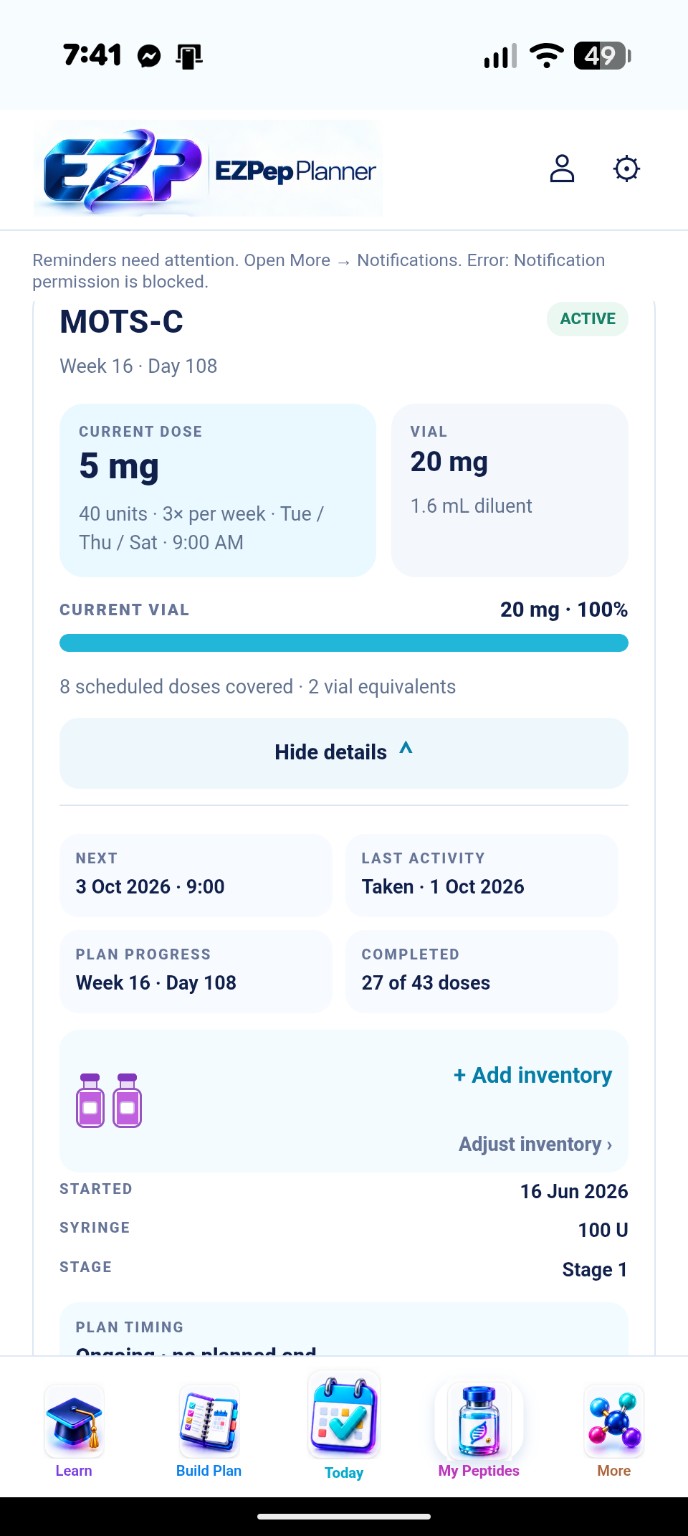
See your current amount, vial inputs, remaining balance and upcoming coverage. Expand a plan for its next event, last activity and inventory controls.
Review scheduled entries, mark what happened and see completed activity. Each card keeps the amount, syringe units and volume together.
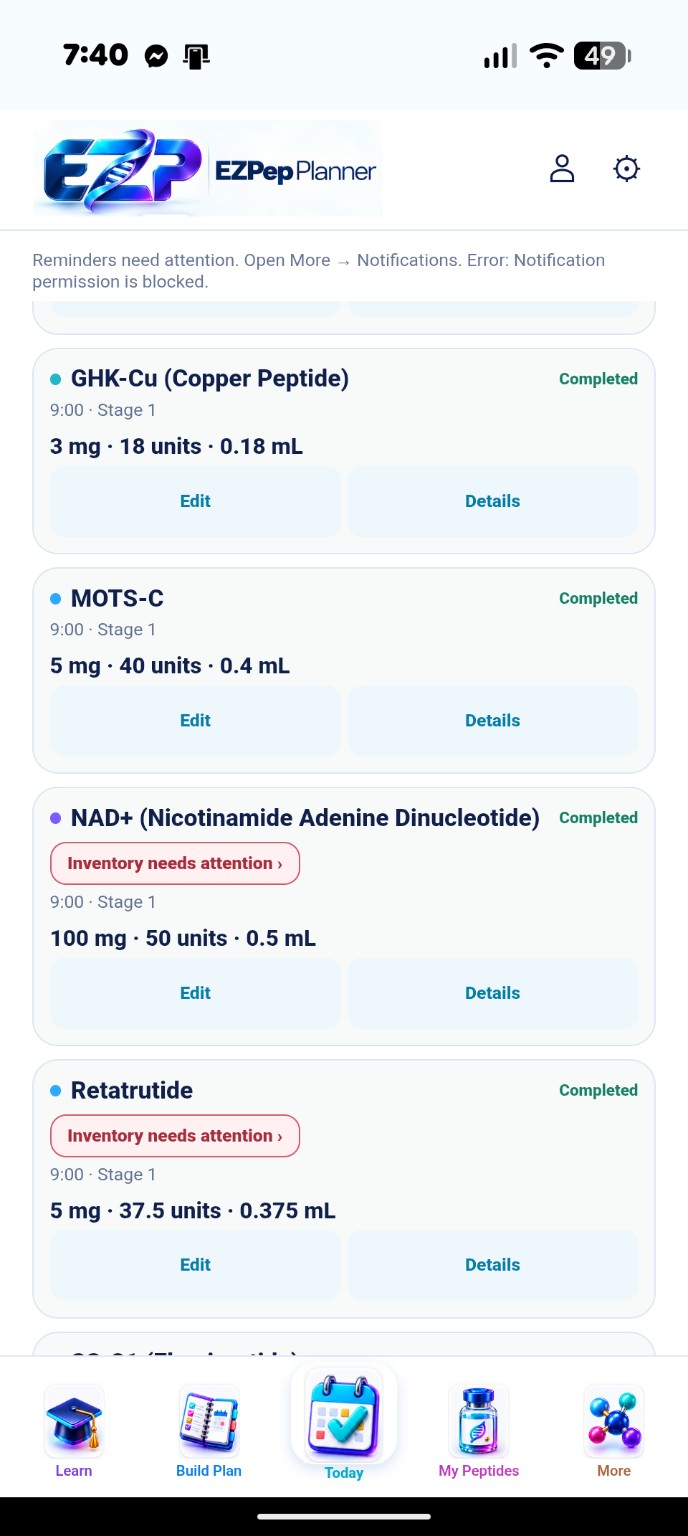
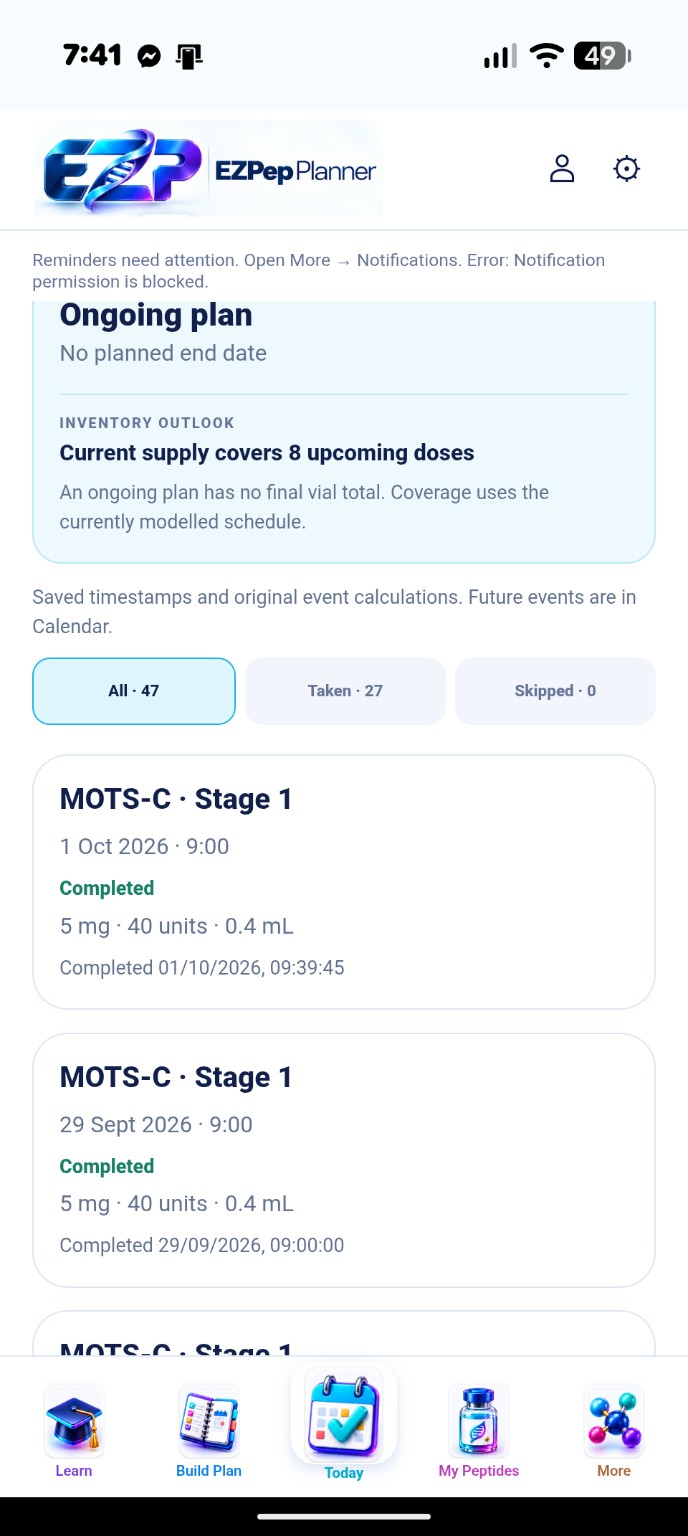
Filter taken and skipped records, then revisit the saved date, original values and actual completion timestamp for an event.
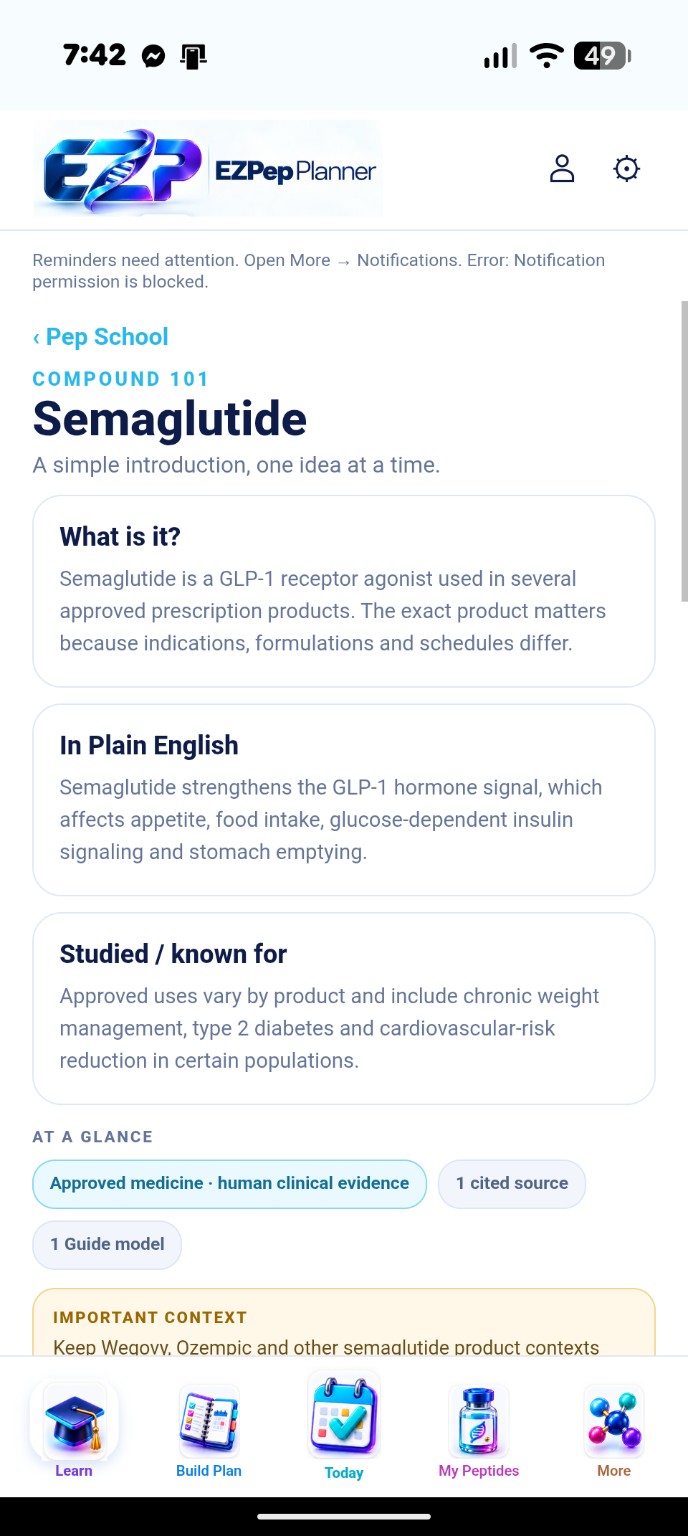
Open a compound introduction for plain-English explanations, evidence labels and cited-source context. Learning stays separate from the quantities you enter.
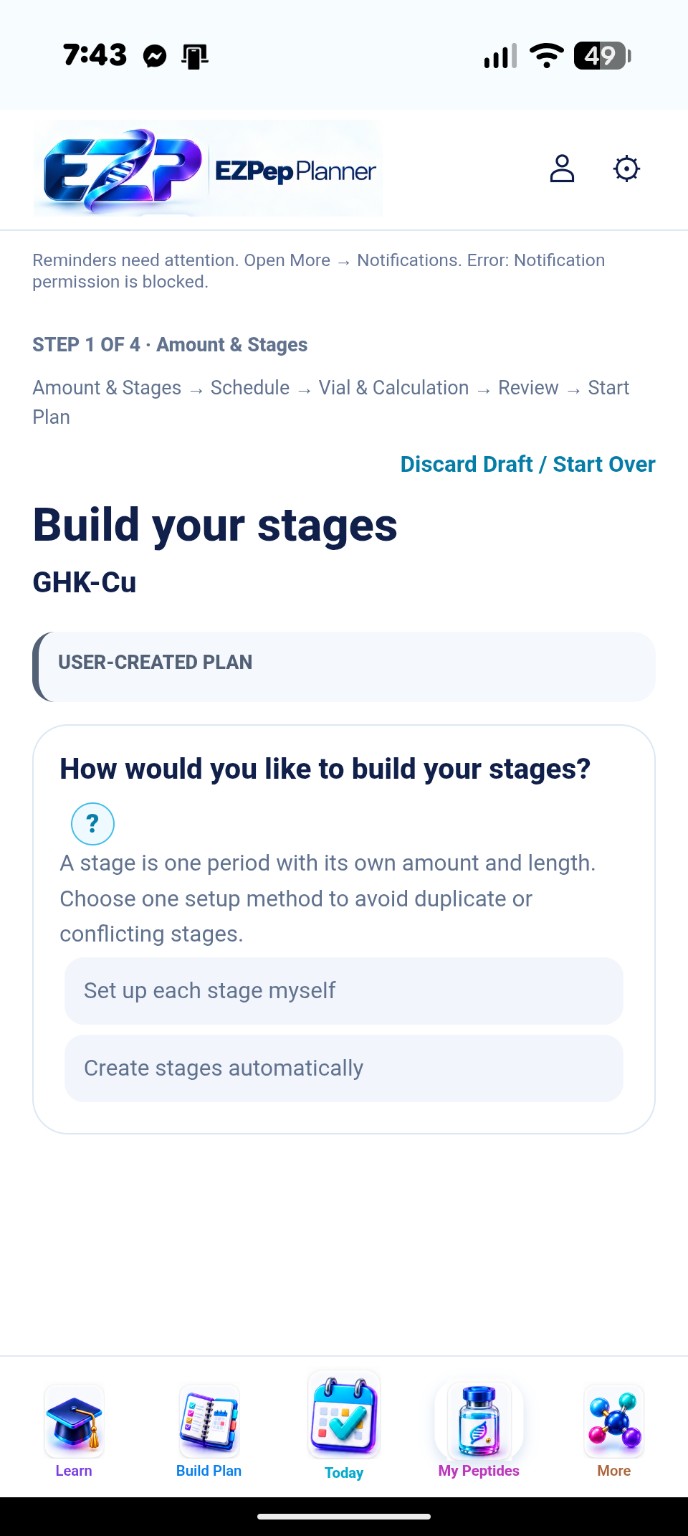
Give each period its own amount and length. Set up stages yourself or use the available stage-building controls, with question-mark help beside the fields.
Review the calculated draw for each stage, start date, vial inputs and optional inventory setup before completing your plan.
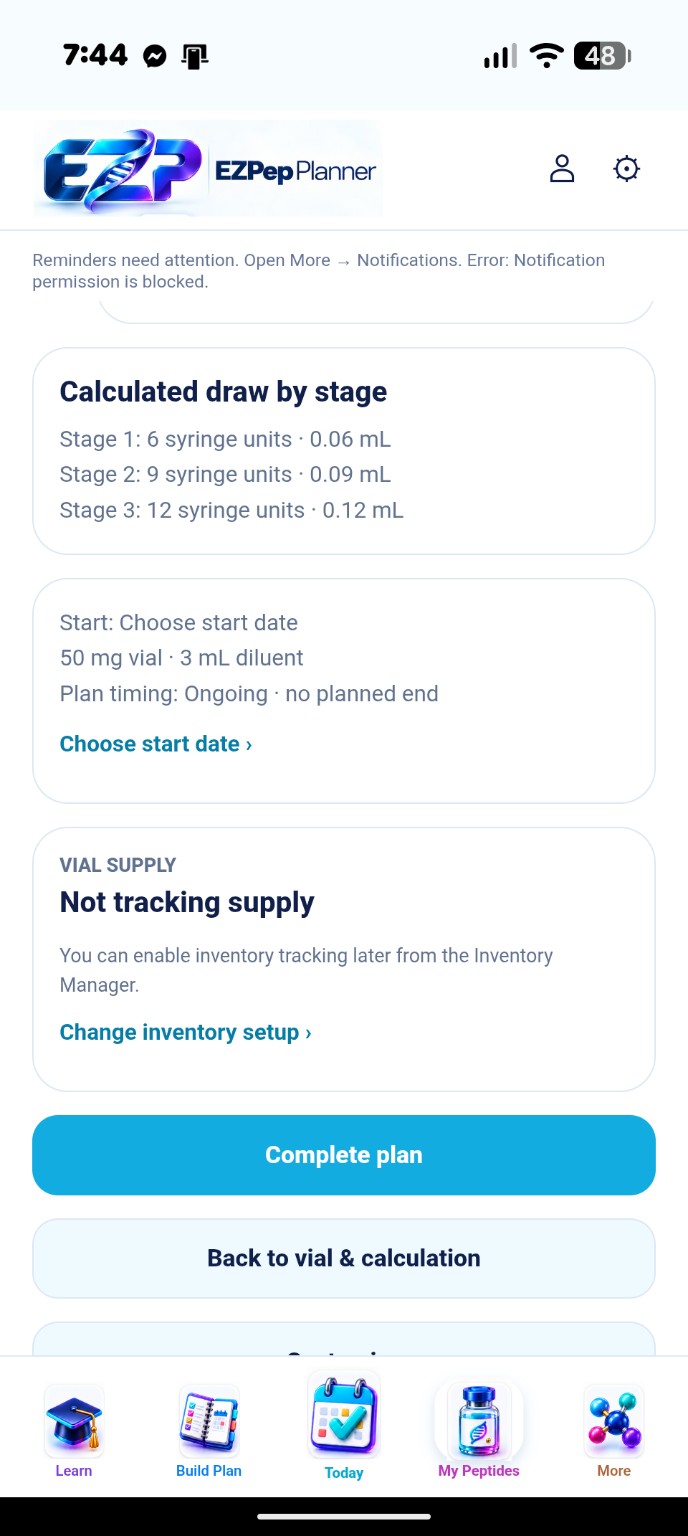
These are focused views of actual owner-provided phone screenshots. The original images are unchanged; the page frames the relevant app content. Displayed values illustrate the interface and are not recommendations.
Your saved history and your plan timeline, together in one clear view.
The example shows week 5 of a saved 12-week active / 4-week break plan. Recorded doses stay separate from the plan timeline; a missed dose does not automatically extend the cycle.
Get launch updates →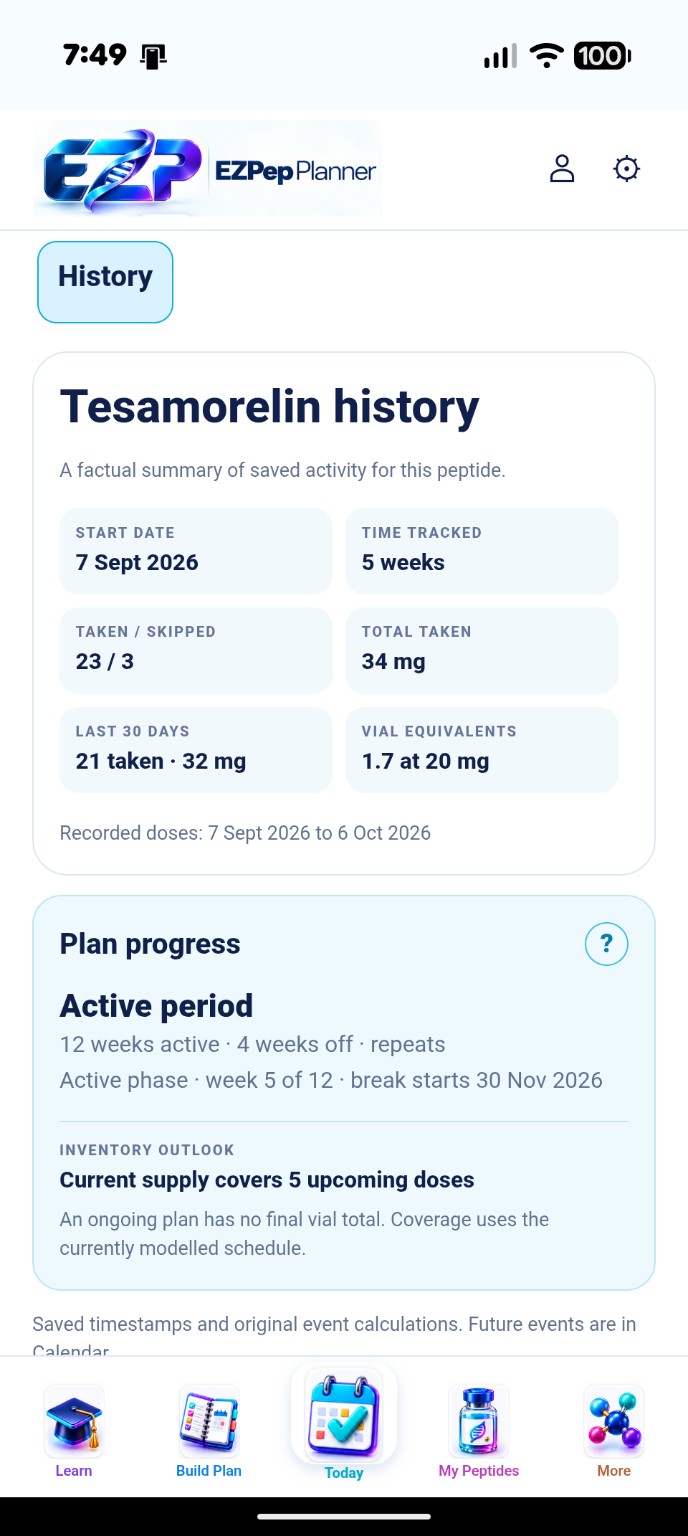
EZPep helps organize your own research and routines. You stay in control of the information you enter.
See upcoming events across your active plans. Record completion or skips and revisit what happened.
Keep vial strength, diluent, syringe units and volume together. The syringe illustration makes the result from your inputs easier to read.
View vial balances, remaining quantities and upcoming schedule coverage. Add or adjust inventory within each plan.
Build a simple plan or arrange multiple stages with their own doses, durations and schedules. Review the coloured stage timeline before saving.
See time tracked, taken and skipped entries, recorded totals and inventory coverage. Repeating plans show your current active or break week and the date the next period starts; saved dose history stays separate from plan progress.
Explore peptide introductions, evidence labels and cited sources. Keep educational references separate from the quantities and schedules you enter.
Professor Lynch helps you find your way through Pep School. Open Learn → Courses for 15 introductory readings across Foundations, Planning Fundamentals and Research Literacy, included on Free and Pro. Lesson progress is saved on your device for your account.
Preview supported CSV imports before applying them. Export a private EZPep backup and review a backup before restoring it.
Your planner saves locally first. Review account cloud status before changing devices, and resolve conflicts without clearing your saved data. Unsynced changes stay on the original device.
EZPep is an educational research, planning and tracking tool. It does not select a peptide, prescribe a dose or replace professional medical advice.
Sign in with your existing beta account. New to the app? The introduction helps you find your starting point.
Enter the plan and schedule you want to track. Review the details before saving; EZPep works with the information you provide.
Record what happens, adjust your own schedule and revisit your history. Set up reminders on your preferred device if you want them.
We’re preparing Free and Pro memberships. Public registration and paid checkout are not open yet.
Existing invited beta members keep their current access. You do not need to buy a subscription to continue the beta.
Get launch updatesCAD $7.99 / month
Planned regular monthly price · plus applicable taxes
Our introductory offer is being finalized. The launch price, duration and renewal price will be clearly shown before you subscribe.
These are planned membership options. Public Free/Pro limits and paid enrollment are not activated in the current beta.
Get launch updatesUse Account for membership information and your referral dashboard. Use Open Planner for your plans, learning, tracking and history.
Sign in to the dedicated account area with your existing EZPep email and password. Public registration and paid membership remain closed while launch checks are completed.
The planned member reward is two free Pro months for each confirmed paid referral. Referral sharing and rewards activation are still paused; no reward is earned just by opening the dashboard.
The influencer dashboard separates referrals, pending commissions, earned commissions and payouts. Partner earning and payout activation remain paused.
Sign in securely to manage your existing account.
Open AccountA few clear answers, right when you need them.
Professor Lynch explains the controls inside EZPep. Browse the topics below for app access, learning and saved records.

Find your way around the planner.
Yes. In the planner, open More and choose “Add EZPep to Home Screen” for the steps for your phone. Once added, open EZPep from its Home Screen icon.
You can also open the planner in your desktop browser. Sign in with the same approved account and check cloud status before transferring your saved planner to another device.
Get launch updatesDose is the quantity of peptide recorded for a scheduled event, in mg or mcg. Volume is the liquid quantity in mL. Syringe units describe the draw on the selected syringe. These values are related by your vial and diluent inputs, but they are not interchangeable.
Professor Lynch’s question-mark help explains the fields inside the planner. Review the selected units and inputs before saving; EZPep does not choose a dose for you.
Open the planner, choose Learn, then Courses. The current beta includes three introductory paths with 15 short readings. Select a course and open a lesson to read it.
Mark lessons complete and use Continue learning to return to the next unread lesson. Progress is saved on this device for your signed-in account; it does not sync between devices. Full course content and membership access rules are still being prepared.
Get launch updatesKeep your routine and records together.
The planner keeps a local copy on your device. With cloud backup enabled, daily saving and catch-up when you reopen keep cloud-saved information up to date. Check the app’s cloud status before changing devices; changes that have not reached the cloud cannot be restored from a cloud backup.
Keep the app open if it shows a save or sync problem. Use its recovery and conflict guidance rather than clearing browser storage.
Open More → Notifications. Review reminder availability, plan settings and device setup. Enrollment is limited during the beta. On iPhone, use Safari to add EZPep to your Home Screen, then open it from that icon.
Reminders are a beta feature. Delivery depends on device and browser settings; check schedule coverage in the app and do not rely on a notification as your only record.
Use the feedback form inside EZPep. Include what you were doing, what you expected and what happened. Add a screenshot only if you want to share it, and review it for private information first.
Wait for “Feedback sent successfully.” If an attachment is still pending, keep the report open and use the retry guidance.
Sign in, recover access and understand launch plans.
Use the email address approved for your beta account. Sign in with your email and password. If you previously used email codes, choose “Use an email code / set up a password” on the account screen. Keep the same account—you don’t need to register again.
Get launch updatesEnter your account email on the sign-in screen and select “Forgot password?”. Open the reset email and follow the secure steps. Check spam if it does not arrive. Never share your password, sign-in code or recovery link in feedback.
Launch-update links can attribute email signups to a partner. Paid referral rewards and influencer commissions are not activated yet. The planned member reward is two free Pro months for a confirmed paid referral, subject to the launch terms. Opening an account dashboard does not activate referral earning.
Get launch updatesOpen More → Beta privacy & consent in the planner to review the current participation and privacy information. Review it alongside the consent shown when using account and feedback features.
The planner’s notices explain the current beta participation and privacy arrangements.
Get the launch date and introductory offer by email. Explore the app above, then join us when you’re ready.
Information for the current private beta.
EZPep Planner is operated by Full Force Enterprises Inc. Your planner saves information on your device. Account features also support cloud-saved plans and synchronization; unsynced device changes are not included in cloud backups.
Account services support secure sign-in and account management. Read the account service-provider disclosure. Transactional emails use Brevo, and the prepared membership checkout uses Stripe. Feedback is shared privately with beta reviewers when you consent to submit it. Review screenshots before attaching them.
The full launch privacy policy is being prepared, including service-provider locations, retention, account-data requests and a monitored privacy contact. Existing beta privacy and consent controls remain available inside the planner.
EZPep is an educational research, planning and tracking tool. It does not diagnose, prescribe or choose a peptide or dose for you. Check your inputs and follow advice from a qualified healthcare professional.
Beta features may change and contain errors. Reminders depend on supported device settings and permission. Keep an independent record and use the app’s export and recovery controls for your data.
Paid service terms will be available for review before enrollment opens.
EZPep Pro is CAD $7.99 per month plus applicable taxes, billed monthly and renewed automatically until you cancel. Review the price and tax total shown at checkout before confirming a purchase. Existing beta access continues independently of paid membership.
Cancellation and refunds
Cancel your Pro subscription renewal at any time without a cancellation fee. Your Pro access continues until the end of your paid billing period.
We do not ordinarily refund the current billing period or unused days. For cancellation help, billing errors, duplicate charges or significant service problems, contact login@ezpepplanner.com. We review requests individually and provide refunds where appropriate or required by law. This policy does not limit your statutory rights.
Operated by Full Force Enterprises Inc., Unit 9, 45905 Yale Road, Chilliwack, BC V2P 2M6, Canada.
For account help, billing questions, privacy requests or an account-deletion request, email login@ezpepplanner.com. You can also use the feedback form inside EZPep to report a problem or suggest an improvement.
Include the screen and steps involved, but never send passwords, verification codes, recovery links or payment-card details. An account-deletion review request does not immediately delete your account or cancel a subscription.